
Meta Quest 3 & 3S Battery Draining While Playing? How to Set Up Continuous Tethered Power

Your Quest 3 or 3S battery is draining while playing — dropping even in shorter sessions, and dying right when a game or a film gets good. That is the battery-draining-while-playing problem almost every Quest owner searches for, and the fix is not a new headset: it is continuous tethered power, set up properly.
Quick Answer: Yes — a Quest 3 or 3S can keep playing while tethered if USB-C power in matches power out during play. The headset's internal battery runs about 2–3 hours per charge and charges over its USB-C port. Use USB-C PD gear rated above the headset's draw, never a phone-only low-output port.
Join The Charge-Up — one charging or gear tip that actually saves you time, every week. No spam.
Disclosure: AK NextG sells the products featured below. As an Amazon Influencer, I may earn from qualifying purchases.
Published November 3, 2026 · Updated November 3, 2026
Why the Battery Drains While You Play
The Quest 3 and 3S carry their battery inside the headset, and that internal battery is in the 2–3 hours class per charge. A long game, a full film, or a virtual-desktop session can run longer than that — so the battery falling while you play is the design's normal limit, not a defect in your unit. Quest is not alone in this: read how every 2026 headset handles charging and you will see the same 2–3 hour pattern across the whole category.
The way out is the one every headset maker builds in: the Quest charges over its USB-C port, so it can take power in while you use it. Set that up once, and a session stops being a countdown.
The Honest Wattage Note — Read This First
We are not going to invent a number here. Meta has not confirmed a bundled-adapter wattage for the Quest 3 / 3S in the sources we checked, so we will not state any wattage as an official Meta spec. What does exist is a third-party accessory ecosystem — packs and docks built around roughly 18W USB-C PD practice. Treat that figure as accessory-market practice, not a Meta specification. The safe rule is headroom: feed the headset from a USB-C PD source rated well above that accessory-class draw, through a cable that is never the bottleneck, and let the headset take what it needs.
Set Up Continuous Tethered Power — Step by Step
Step 1: Pick a power source with headroom
At a desk, the AK NextG PowerDesk 6-in-1 is a 105W GaN station — enough headroom to feed the headset and still charge a phone and a laptop from the same station. $79.99
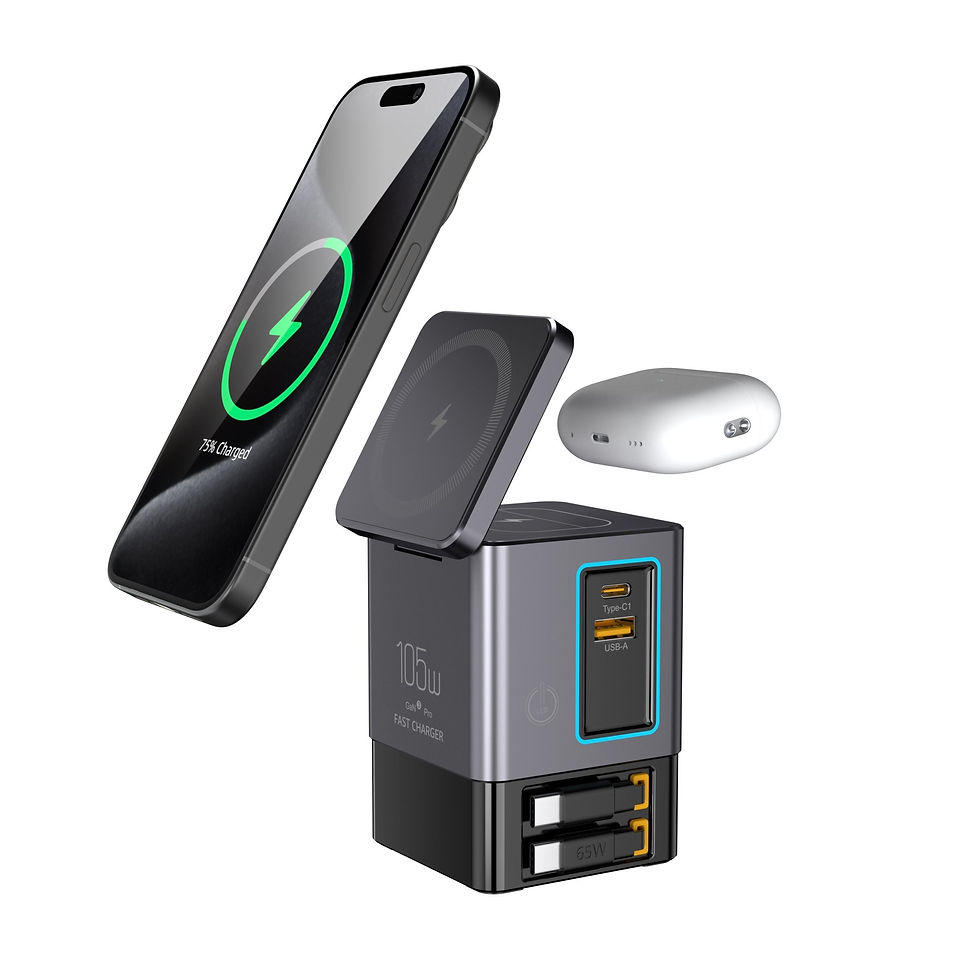
On the couch or on the road, the AK NextG TravelCharge 70 delivers 70W from a compact GaN charger with a built-in retractable USB-C cable. $44.99
Step 2: Give yourself reach — the cable is the setup
A tether only works if you can move. The AK NextG PowerCord 240W is a braided USB-C cable rated at 240W — our own verified rating — so the cable is never the weak link, and its reach lets the power source stay at the wall or desk while you stay in your play space. $16.99

Step 3: Route the cable so it never fights you
Run the cable behind or above your play area, never across the floor where feet find it.
Leave slack at the headset end so turning your head never tugs the USB-C port.
Start the session plugged in, not at 10% — tethered power holds and slowly rebuilds a battery far better than it rescues a nearly empty one.
Step 4: Confirm it is working
After 15–20 minutes of play, check the battery indicator. Holding steady or rising slowly means power in is matching power out — your setup works. Still falling means something in the chain is the bottleneck: move to the station's main USB-C port first, then try the cable direct from the charger, one change at a time.
Which Setup Fits How You Play?
Play style | Power source | Cable | Price |
Desk / PC VR sessions | PowerDesk 6-in-1 — 105W GaN station | PowerCord 240W braided | $79.99 + $16.99 |
Couch films and games | TravelCharge 70 — 70W GaN | Built-in retractable USB-C | $44.99 |
Travel / second room | TravelCharge 70 — 70W GaN | PowerCord 240W braided | $44.99 + $16.99 |
Not sure which wattage class your other gear needs? Our AK NextG Charger Price Guide walks through every option by device.

Get the Gear in the App
Prefer to shop on your phone? Download the AK NextG app and use code APP20 for 20% off your first app order.
Verdict
Product | Power | Price |
PowerCord 240W Braided + Stand | 240W rated USB-C cable | $16.99 |
PowerDesk 6-in-1 | 105W GaN, 6-in-1 station | $79.99 |
TravelCharge 70 | 70W GaN, retractable cable | $44.99 |
Pros
Continuous play without watching a battery countdown
One setup covers desk, couch, and travel play
Every rating quoted is our own product's verified rating — no invented headset specs
Cons
A tether is still a cable — routing it well takes five minutes of setup
AK NextG does not sell a USB-C power bank yet, so untethered session extension is a third-party buy for now
Verdict: Who should buy — Quest 3 and 3S owners whose sessions keep dying mid-game or mid-film. Start with the PowerCord 240W for reach plus the TravelCharge 70 for the couch, and add the PowerDesk 6-in-1 if your headset lives at a desk.
Buy the setup on the AK NextG store pages above — PowerCord 240W, PowerDesk 6-in-1, and TravelCharge 70 — or find tethered-power accessories also on Amazon.
As an Amazon Influencer, I may earn from qualifying purchases.


Comments