
How to Set Up Perfect Desk Lighting for WFH

Working from home with tired eyes and a shadow for a face on every video call? That is almost never a monitor problem — it is a lighting problem. Most home offices run on one overhead light and a screen that is too bright at night, and the fix is not a brighter room. It is layered light, each layer doing one job.
Quick Answer: Layered lighting fixes WFH eye strain: a monitor light bar lights the desk, bias light softens the screen, and soft front light fixes video calls. The AK NextG LightBar Pro is a 41cm bar with 5W USB power, a wireless remote, and a 50,000-hour LED lifespan. It fits flat monitors from 24 to 34 inches.
Join The Charge-Up — one charging or gear tip that actually saves you time, every week. No spam.
Disclosure: AK NextG sells the products below. As an Amazon Influencer, I may earn from qualifying purchases.
Published November 16, 2026 · Updated November 16, 2026
The Problem With Overhead Lighting Alone
Ceiling lights bounce off your monitor as glare. You strain to see the keyboard, turn up the monitor brightness to compensate, and your eyes end up working twice as hard. On camera it is just as bad: light from above carves shadows into your face. One light source cannot fix any of that — layers can.

Layer 1: The Monitor Light Bar
The AK NextG LightBar Pro sits on top of your monitor and directs light downward and forward — onto the keyboard, your hands, and your notepad — with no light going toward the screen, so there is no glare to fight.

Asymmetric beam — desk lit, screen untouched
Adjustable brightness and warm-to-cool color temperature, from the wireless remote
Aluminum alloy body, 50,000-hour LED lifespan
41cm bar, weighted clip fits flat monitors from 24" to 34" (top edge 1mm–30mm thick, no tools)
5W USB-powered — plugs into your monitor's USB port, a laptop, or a desk hub
$34.99
Choosing between light bars first? Our Best Monitor Light Bars guide compares what actually matters — beam pattern, length, and power.
Layer 2: Bias Lighting
An LED strip behind your monitor reduces the contrast between the bright screen and the dark wall around it — the contrast your eyes keep re-adjusting to all day. It plugs into a spare USB port; if your monitor is out of ports, run it from your desk hub (see the verdict below).
Layer 3: Video Call Lighting
Face toward a window when you can. When you cannot, add a small, soft light at eye level in front of you — never only the overhead. Combined with the light bar lighting your desk instead of your screen, your face stops reading as a shadow puppet on calls.
Color Temperature by Time of Day
Time | Setting |
Morning focus | Cool, daylight-style white |
Evening sessions | Warm, low and soft |
Video calls | Bright, neutral daylight white |
The LightBar Pro's remote makes this a two-second change from your chair — cooler for morning focus blocks, warmer for late sessions.
Powering the Whole Desk
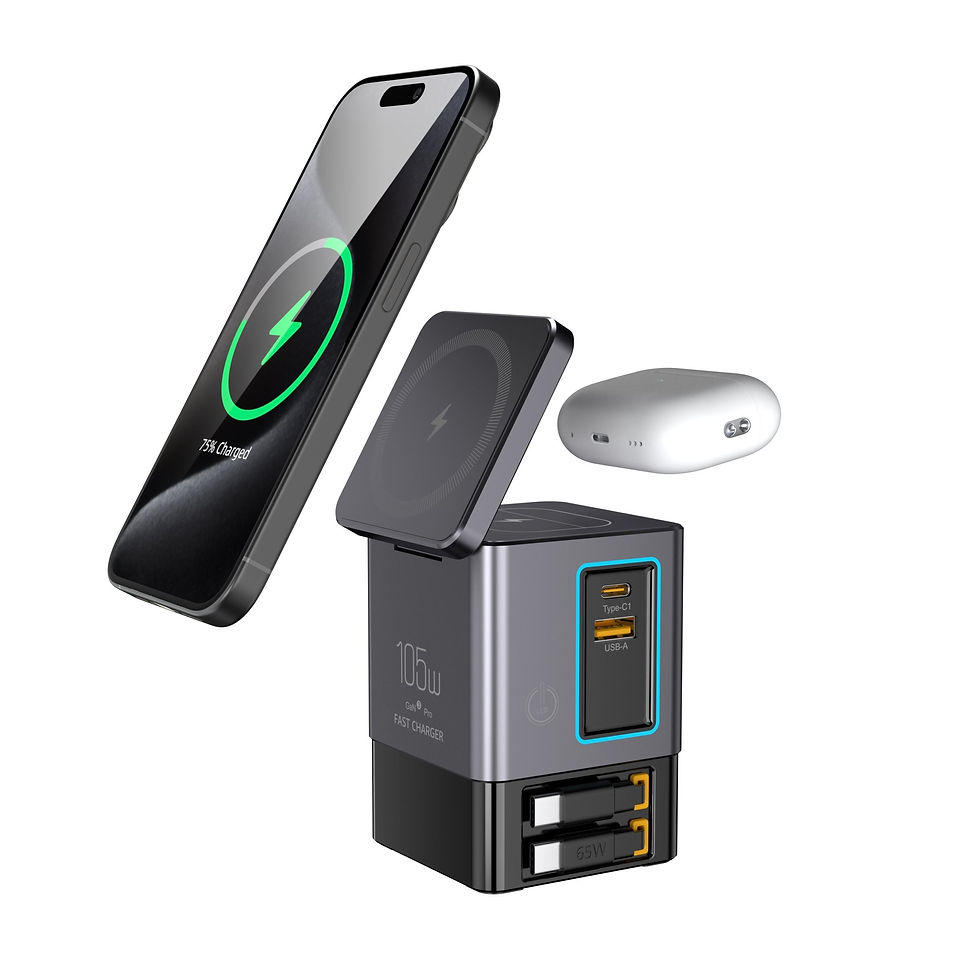
Every layer needs a port. The AK NextG PowerDesk 6-in-1 is a 105W GaN station that powers the bias strip and charges your laptop, phone, and earbuds from one place on the desk. $79.99 Comparing desk gear by device first? Our AK NextG Charger Price Guide lays out every option side by side.
Get It in the App
Prefer to shop on your phone? Download the AK NextG app and use code APP20 for 20% off your first app order.
Verdict
Product | Key specs | Price |
LightBar Pro | 41cm, 5W USB, wireless remote, 50,000-hour LED | $34.99 |
PowerDesk 6-in-1 | 105W GaN station (powers bias light + charging) | $79.99 |
Overhead light alone | Lights the room and the screen — glare included | $0 (already own it) |
Pros
Layer 1 alone removes the glare-and-brightness spiral most WFH desks live with
USB-powered at 5W, so the bar runs off the monitor, a laptop, or a hub with no extra adapter
Wireless remote and warm-to-cool adjustment cover focus work, evenings, and calls from one bar
Cons
Flat monitors only — a curved top edge will not hold the clip
Bias strips and a call light are separate purchases — the bar is layer 1, not the whole setup
Verdict: Who should buy — Anyone working from home under a single overhead light: start with the LightBar Pro, add bias lighting when the room goes dark, and add the PowerDesk 6-in-1 if you are out of USB ports to run it all.
Buy from AK NextG: LightBar Pro · PowerDesk 6-in-1
Also on Amazon: Shop AK NextG on Amazon →


Comments